

Beauty Salon Website Design That Fills the Appointment Book
Salon websites for hair, beauty, nail, spa and barber businesses, designed around one action: booking the next appointment.
A good fit if
- Clients book through Instagram messages and some of them slip through
- Your booking app works but your website looks nothing like your salon
- Your prices are buried in a PDF or missing altogether
- You are opening a new salon and want the site live before the doors are
A salon sells the experience before anyone sits in the chair. Your site has a few seconds on a phone to show the look, the price and a free slot. Get those three right and the booking follows.
Services
Beauty salon website design services
Design and build by one team, so the site feels like your salon and not like your booking app.
Booking in the first screen
A booking bar in the hero: pick a service, a stylist and a date. Connected to the booking software you already use, or a request flow if you have none.
Service menus with prices
Every treatment grouped by discipline with a starting price and duration, so clients know what they are booking and stop messaging to ask.
Stylist and artist profiles
Who does what, their specialties and their work, so clients can book a person rather than a slot.
Lookbooks and galleries
Seasonal looks, colour work and before and after photos laid out like an editorial spread, and still quick to load.
Gift cards and packages
Pages for vouchers, bridal packages and treatment courses, with payment where your booking platform supports it.
Multi-location salon sites
A page for each salon with its own hours, team, map and booking link, sharing one menu and one brand.
Ideas
Beauty salon website ideas that turn browsers into bookings
The strongest hair salon website examples share a few habits. These are worth copying.
Lead with your own work
Real photos of your clients and your space. Stock models tell a new client nothing about what you will do with their hair.
Show a price on every service
A 'from' price cuts the 'how much is a balayage' messages and filters out people who were never going to book.
One booking button, everywhere
The same Book now button in the header, the hero, each service and each stylist page, always going to the same place.
A tone that matches the chair
A luxury salon needs quiet type and space. A busy barber needs speed and a big phone number. The design follows the business.
Instagram, but on pages you own
Show the feed on the site, but keep services, prices and booking on pages Google can read and you control.
Local search
Online booking and local SEO for beauty salon websites
'Hair salon near me' is settled in the map pack. Your site and your Google Business Profile have to agree with each other.
A Google Business Profile with a Book button
Your profile linked to your booking page, services listed, hours kept current and fresh photos added each month.
A page for each service that matters
A page for balayage, lash extensions or bridal makeup can rank for that search. One long 'services' page ranks for none of them.
Reviews while the hair still looks good
A follow-up message after each visit with a direct link to your Google review form, sent the same day.
Local business schema
Structured data for your salon type, hours, price range and location, so search engines read the basics correctly.
Fast on a phone
Most salon searches happen on mobile, often on the move. Pages load quickly and booking works with one thumb.
How it runs
How we build a salon website
- 01
Menu and booking audit
Services, prices, durations, staff and your booking tool, mapped before design starts.
- 02
Brand and look
Type, colour and photography direction that feels like walking onto your salon floor.
- 03
Build and connect
Pages, booking links, gift cards, analytics and schema, with previews you can try on your own phone.
- 04
Launch and local setup
Google Business Profile updated, review links in place and a CMS your front desk can use to change prices.
Cost
How much does a salon website cost?
Beauty salon website cost depends on how booking works and how many services and locations you run. We give a fixed quote after a short call, and these are the things that move it.
Get a fixed quote→| What moves the price | Why |
|---|---|
| Booking: linked, embedded or custom | Linking to your booking app is quick. A custom booking bar with service, stylist and date steps takes longer. |
| Size of the service menu | Twenty services on one page is simpler than a separate page for each treatment, written to rank. |
| Locations and staff | Each salon and each stylist profile adds pages, photos and booking routes. |
| Photography and lookbook | A shoot and an editorial lookbook are scoped separately from the build. |
| Shop, gift cards and memberships | Selling products or vouchers online adds payments and stock handling to the project. |
| Brand work | If the salon needs a new logo and identity, design starts there before the website. |
Live proof
Salon website example we have shipped.
Tools we use for this
- Next.js
- React
- Tailwind CSS
- GSAP
- Sanity
- Stripe
- Schema.org
- Google Analytics 4
- Vercel
FAQ
Beauty salon website design questions
It depends on how booking works, how many services and locations you have, whether you sell gift cards or products, and whether you need photography or a new brand. A single salon linking to its existing booking app is a much smaller project than a multi-location group with stylist profiles and a custom booking bar. We give a fixed quote after a short call, and the start a project form lets you choose a budget range up front.
A Book now button on every page, a service menu with starting prices and durations, stylist profiles, real photos of your work and your space, opening hours, a map and parking details, and reviews you have permission to show. Add gift vouchers if you sell them and a page for each signature treatment you want to be found for. Keep the menu in a format your team can update, so prices on the site never fall out of date.
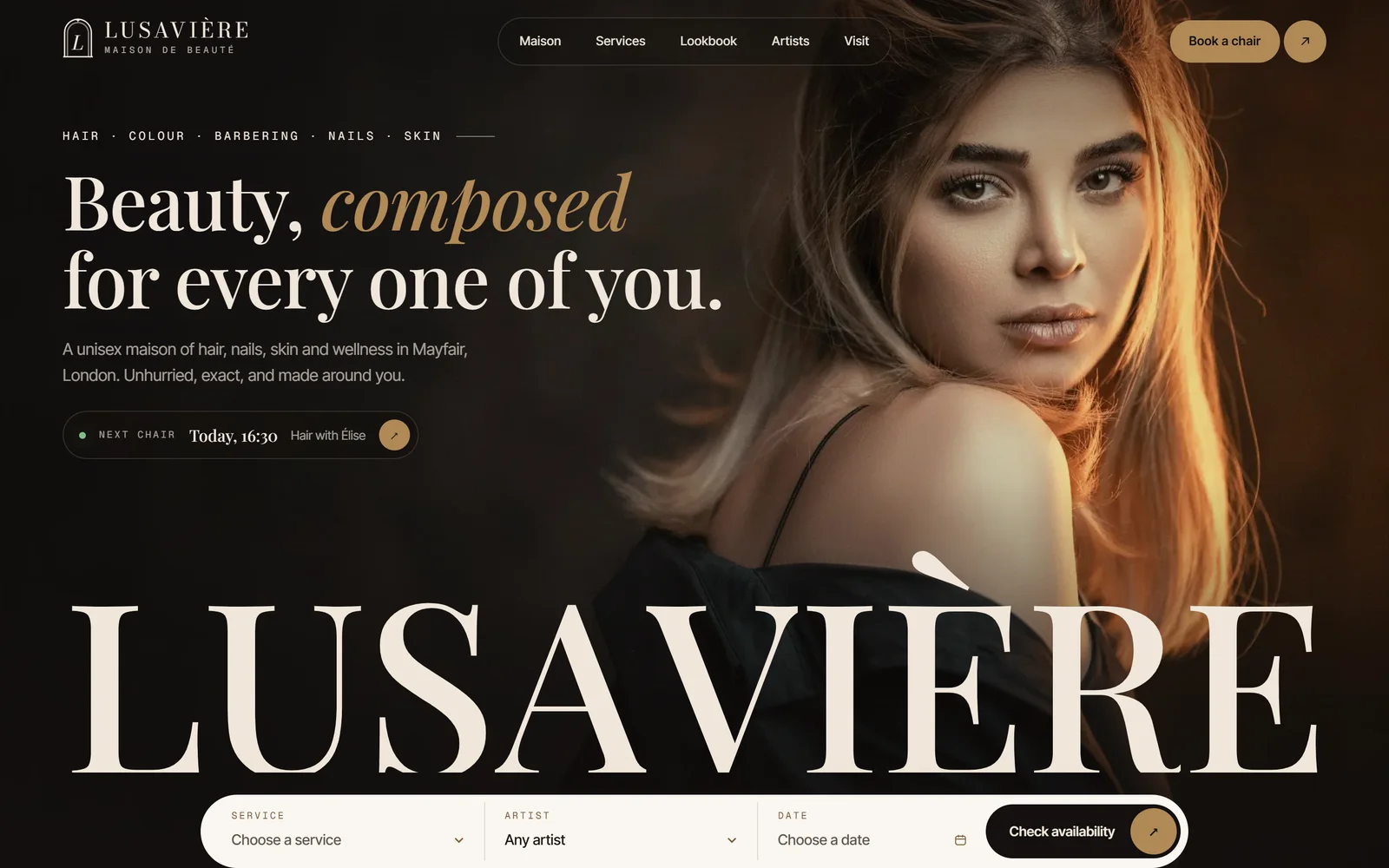
The best ones put booking in the first screen, show real work instead of stock models, list prices openly and feel like the salon itself. Our own example is Lusavière, a luxury unisex salon site with a booking bar in the hero where you pick a service, an artist and a date, eight service disciplines each with a starting price, an editorial lookbook for the season and serif type for a quiet, luxury first impression.
Yes. If you use online booking software, we connect the site to it so clients can pick a service, a stylist and a time without leaving the page or calling. If you do not have booking software yet, we can recommend options that suit your size, or build a request form that sends the details to your front desk. Either way, the Book now button is never more than one tap away on a phone.
Usually, yes. A booking app page is a calendar, not a brand. It looks the same as every other salon on the platform, and Google rarely ranks it for searches like 'balayage near me'. Your own website carries your look, your prices, your team and your reviews, then hands the client to the booking app at the right moment. Many clients check the website before they trust a salon with their hair.
A builder template is fine for a new salon on a tight budget that needs something live this week. It becomes a problem when you want the site to look like your salon, rank for individual services or connect booking cleanly. A designer builds around your brand, your menu and your booking tool, and sets up the local SEO a template leaves out. Pick based on how much of your work arrives through Google.
Claim and complete your Google Business Profile: the right primary category, accurate hours, every service you offer, a link to your booking page and new photos each month. Make sure the name, address and phone match your website exactly. Ask every happy client for a review the same day, and reply to the reviews you get. Then support it with service pages on your site, so Google can confirm what you offer.
Yes, at least a starting price for each service. Clients compare salons on price before they book, and when a site hides prices, many simply move on to one that does not. A 'from' price with a note that the final cost depends on hair length or consultation is honest and cuts down the messages your team answers. Luxury salons do this too: a clear price signals confidence, not discounting.
Yes. Luxury salon websites need more restraint, not more features: quiet serif type, generous space, editorial photography and slower, deliberate motion, with booking still right at the top. Lusavière, our salon example, uses a full-screen preloader and a seasonal lookbook to set the tone before a client chooses a service. We design the brand feel and build the site in the same team, so the calm survives into the code.
Yes. We set up the service menu in a simple content editor, so your team can change a price, add a treatment or swap a lookbook photo without a developer. Prices update across every page they appear on at once. If you would rather not touch it, we offer a monthly retainer for updates, new pages and seasonal changes, and we reply within one business day.