

Construction Company Website Design for Contractors, Builders and Logistics Firms
Websites for construction, civil, heavy transport and equipment businesses that show your capacity at a glance and put a quote request in front of every visitor.
A good fit if
- Your work comes from referrals and the website does nothing to back them up
- Buyers ask for a capability statement and you send a PDF
- Your fleet, plant and past projects are not on the site at all
- Site managers find you on their phone and cannot see how to call
Contractors and buyers hire on trust and capacity. Before they call, they want to know three things: can you do this kind of job, do you have the machines and people for it, and how fast can they get a price. A construction website should answer all three on the first screen.
What buyers check
Construction company website design: what clients check first
Procurement teams, developers and homeowners all check the same few things before they pick up the phone.
Proof of past projects
Project pages with scope, location, sector and photos, so a buyer can see jobs like theirs.
Capacity: fleet, plant and people
The machines and vehicles you run, with their capacity, plus the crews and certifications behind them.
Services, card by card
Each service on its own card and page, from dump trucks to earthmoving, so nobody has to guess whether you do it.
Safety and accreditations
Insurance, licences, safety policies and memberships you hold, placed where procurement teams look for them.
A fast way to a price
Request a Quote in the header and the hero, Call Now on mobile, and a form that collects what your estimator needs.
What we build
Construction and logistics company website features
Built for contractors, builders, civil firms, heavy transport operators and equipment hire.
Quote request forms
Step-by-step forms that ask for job type, location, dates and loads, accept drawings as uploads and go straight to the right estimator.
Fleet pages
Each vehicle or machine with photos, capacity and the jobs it suits, so buyers can check you have the right kit before they call.
Logistics and transport company websites
Routes, load types, service areas and a direct line to dispatch for haulage and heavy transport businesses.
Project portfolios by sector
Residential, commercial, infrastructure and industrial work, filtered so each buyer sees relevant projects first.
Language switcher
Content in more than one language, for clients, crews or regions that do not all read English.
Careers and recruitment
Job listings and a simple application form, because a construction website is often a hiring tool too.
Local search
Local SEO for construction company websites
Most work is regional. You need to rank where you can actually send a crew.
Service area pages
A page for each region or city you cover, with projects from that area, instead of one page that claims everywhere.
A Google Business Profile done properly
The right primary category, your service area set, project photos uploaded and a phone number that reaches a person.
A page for each trade
'Demolition contractor', 'earthmoving services' and 'heavy haulage' are separate searches. Each needs its own page.
Local business schema
Structured data for your business type, service area and contact details, so search engines read them correctly.
Calls and quotes tracked as leads
Click-to-call and quote requests tracked in analytics, so you know which pages bring in work.
How it runs
How we build a construction website
- 01
Scope the business
Services, fleet, regions, sectors and how quotes are handled today.
- 02
Plan around the quote
Pages and forms structured around the information your estimator needs to price a job.
- 03
Design and build
A bold, fast site with real photos of your machines and crews, previewed on the phones site managers use.
- 04
Launch and local setup
Google Business Profile, analytics, call tracking and a CMS to add projects and fleet.
Cost
How much does a construction company website cost?
Construction company website cost depends on the number of services, the fleet and project content, and how quotes are handled. We quote a fixed price after a short call, and these are the things that move it.
Get a fixed quote→| What moves the price | Why |
|---|---|
| Number of services and sectors | A contractor with four services needs fewer pages than one covering civil, commercial and residential work. |
| Fleet and project pages | Each machine type and case study needs photos and specifications gathered and laid out. |
| Quote form complexity | A simple contact form is quick. A multi-step quote form with file uploads and routing takes longer. |
| Languages | Each extra language adds translation management and checks on every page. |
| Service area pages | Pages for each region you work in are scoped by number and by who writes them. |
| Integrations | Sending quotes to a CRM, estimating tool or email workflow adds build and testing time. |
Live proof
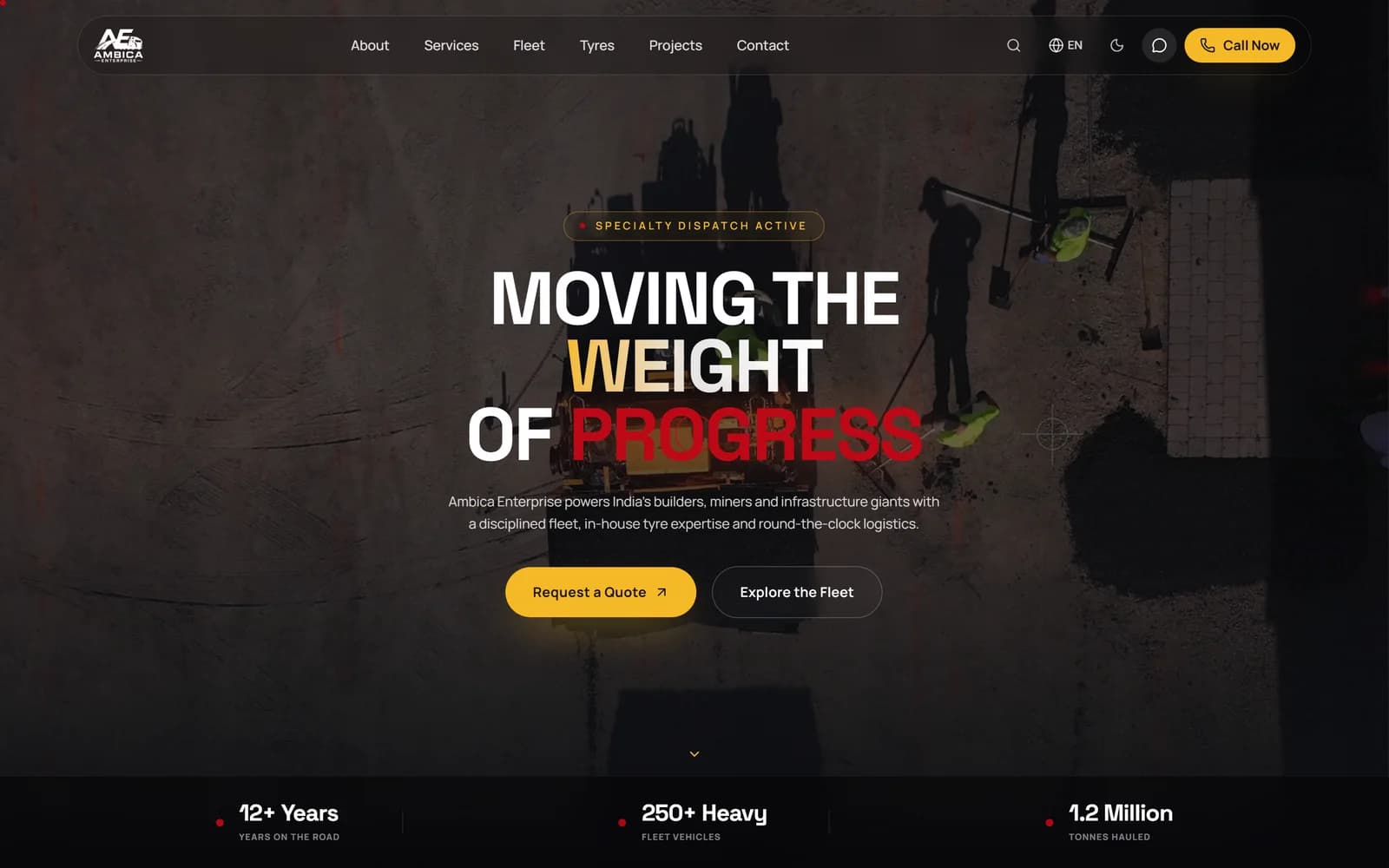
Construction company website example we have shipped.
Tools we use for this
- Next.js
- React
- Tailwind CSS
- GSAP
- Sanity
- Schema.org
- Google Analytics 4
- Vercel
FAQ
Construction company website design questions
It depends on how many services and sectors you cover, how much fleet and project content goes on the site, how detailed the quote form is, and whether you need more than one language. A contractor with a handful of services and a simple quote form is a smaller build than a multi-region firm with fleet pages and CRM routing. We give a fixed quote after a short call, and the start a project form lets you choose a budget range.
Clear service pages, project examples with photos and scope, your fleet or plant if equipment is part of what you sell, safety and accreditation details, the areas you cover, and a quote request that is visible on every page. On mobile, a Call Now button in the header matters as much as the form. Add a careers page if you are hiring, and keep the projects section current, because buyers check dates.
The best ones feel as solid as the work: bold type, real photos of machines and crews, services laid out so a buyer can scan them, and a quote request that never leaves the screen. Our own example is Ambica, a heavy transport and construction logistics site with a bold hero offering Request a Quote and Explore the Fleet, service cards from dump trucks to earthmoving, key numbers, and Call Now with a language switcher in the header.
Yes, even if most work comes from referrals. A referred client still looks you up before they call, and a missing or dated site makes them hesitate. Procurement teams and developers expect to see projects, capacity and accreditations online. A good website also brings in work from searches in your area that referrals never reach, and it gives you a place to recruit crews when you need them.
Make the quote request impossible to miss and easy to finish. Put it in the header and the hero, ask only what your estimator needs, and let people upload drawings. Add Call Now for mobile visitors. Build a page for each service and each area you work in, with real projects as proof, and keep your Google Business Profile complete. Then track calls and forms so you can see which pages bring in work.
Enough to price the job, and nothing more. Usually that is the type of work, the site location, the rough size or quantity, preferred dates, and contact details. For transport, add load type, weight and pickup and drop points. Let people attach drawings or photos. Break longer forms into short steps so they do not look like paperwork, and send each request straight to the person who quotes.
Yes. For heavy transport and equipment businesses, the fleet is the product. A fleet page with each vehicle or machine, its capacity and the jobs it suits lets a buyer check you can handle their load before they call, which means better enquiries. Use real photos of your own vehicles, keep the list current as you add or retire equipment, and link each fleet item to the quote form.
A template builder can get a small contractor online quickly, and that beats having nothing. It falls short when you need multi-step quote forms with uploads, fleet pages, several languages, service area pages that rank, or a site that stays fast with heavy photography. A custom build gives you those and code you own. Choose based on how much of your work you want the website to win.
Mostly through local search. Complete your Google Business Profile with the right category, service area, project photos and reviews from past clients. On the website, give each trade and each region you cover its own page with real local projects, and add structured data for your business. Keep pages fast on mobile, because many searches come from people on site. Rankings build over months, so start with the services that pay best.
Yes. We set up a simple content editor with templates for projects and fleet items, so your office team can add a finished job or a new machine with photos and details, and publish it without a developer. Images are resized automatically, so the site stays fast. If you would rather hand it off, a monthly retainer covers updates and new pages, and we reply within one business day.